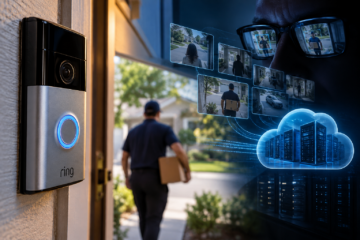


Smart speakers, security cameras, televisions, and connected appliances can collect information about our daily lives. Here is what they may remember—and how to take back control.
Your home may know more about you than you realize.
The smart speaker in your kitchen remembers some of the questions you have asked. Your security camera may preserve footage of people approaching your front door. Your television can collect information about what you watch, while your thermostat may keep a record of when you adjust the temperature.
Individually, these devices offer convenience, security, and entertainment. Together, they can create a detailed picture of everyday life.
That raises a question few consumers consider when purchasing connected technology: What happens to all that information, and can you make it disappear? The answer is more complicated than pressing a delete button.
The Invisible Memory of a Connected Home
The Internet of Things, or IoT, refers to physical devices connected to networks that allow them to exchange information, respond to commands, or operate automatically.
In a modern home, those devices may include smart speakers, televisions, doorbells, cameras, thermostats, lighting systems, appliances, and even robotic vacuum cleaners.
Many collect information necessary for their operation. A thermostat needs temperature readings to regulate heating. A security camera captures video to detect movement. A voice assistant processes spoken requests to answer questions or control other devices.
But some information can also be stored beyond the immediate interaction.
Depending on the product and its settings, that may include voice transcripts, recordings, viewing activity, device usage, movement alerts, location-related information, and household routines.
Not every device collects the same information, and not all data is sent to a company’s servers. Some processing occurs locally, while other features depend on cloud services.
The important distinction is between information a device needs temporarily to perform a task and information a company retains afterward. Consumers are not always aware of that difference.
What Alexa Remembers
Amazon’s Alexa provides a useful example of how connected devices can maintain records of interactions.
According to Amazon’s privacy documentation, users can review and delete voice recordings, text transcripts, and typed requests associated with their accounts.
The Alexa app includes a privacy section where customers can inspect their interaction history and manage retention settings.
Amazon also allows users to select automatic deletion options or choose not to save certain voice recordings.
However, deleting voice recordings does not necessarily erase every record connected to an interaction.
Amazon explains that some related information, such as reminders, shopping lists, actions taken by Alexa, and information held by third-party services, may remain.
That distinction matters. A consumer who deletes a voice command used to create a shopping list should not automatically assume that the shopping list has also disappeared.
How to review Alexa’s history
Open the Alexa app and select More, followed by Alexa Privacy. From there, look for Review Alexa History to inspect or delete past interactions.
Under Manage Your Alexa Data, review the available retention options for voice requests and connected smart-home information.
Settings and features may differ according to the Alexa service, account, and device being used.
The objective is not necessarily to disable every feature. It is to understand what is being saved and decide how long that information should remain available.
What About Siri and Google?
Other voice assistants also provide privacy controls, although their data-handling practices differ. Apple says users can delete Siri and Dictation history associated with their devices. On supported iPhones and iPads, these controls can be found in the Siri settings.
Apple also provides options governing whether certain interactions may be used to improve its services. The company emphasizes privacy-preserving techniques, but it also acknowledges that some information may no longer be associated with an identifier that allows it to be individually deleted.
Google offers activity-management controls for its services, including options to review and remove certain saved assistant interactions through a Google Account.
The precise records available depend on the products, features, and account settings involved.
For consumers, the practical lesson is simple: Owning a smart speaker does not mean every interaction is necessarily stored forever, but neither should users assume that nothing is retained.
Reviewing the manufacturer’s privacy settings is the only reliable way to understand the choices available for a particular product.
Your Television May Know What You Watch
Voice assistants receive considerable attention in discussions about privacy, but smart televisions deserve equal scrutiny.
Some connected televisions use a technology called automatic content recognition, or ACR.
ACR can identify content being displayed and support features such as recommendations, viewing insights, or advertising-related services.
Samsung, for example, explains that ACR is an optional feature on its smart televisions and that users can change their preferences through the television’s settings.
The company says consumers can opt out of ACR and the collection of viewing history. This does not mean that a smart television is secretly recording everything happening in a living room. It means that some televisions can recognize viewing content and use that information according to their settings and privacy policies.
The distinction is important because consumers should understand actual data practices rather than rely on alarming assumptions.
What you can do
Open your television’s settings and look for sections labeled Privacy, Viewing Information, Advertising, or Personalization. Review options related to content recognition, viewing history, and personalized advertising. If you do not want viewing activity used for those purposes, disable the relevant optional features where the manufacturer provides that choice.
Remember that streaming applications may have separate histories and privacy settings. Turning off a television manufacturer’s content-recognition feature does not necessarily delete information collected by Netflix, YouTube, or another streaming service.
Security Cameras: When Protection Creates a Record
Connected cameras and video doorbells can make homeowners feel safer by recording movement and allowing them to check their property remotely.
But these devices may also capture visitors, delivery workers, neighbors, and people who never agreed to participate in a household’s security system.
Depending on the service, video clips may be stored locally, in the cloud, or both. Some services retain recordings for a limited period. Others allow users to select storage plans or manually delete clips. A camera may also maintain a history of motion events, alerts, device activity, or account access. Deleting a video clip from an application does not necessarily mean every related record is immediately erased from every system.
Users should examine the manufacturer’s retention policy and determine whether deletion applies to local recordings, cloud recordings, or both. They should also check who can access the footage. Family members, shared users, and third-party services may have permissions that are easy to overlook after the original installation.
The Data You Never See
Some of the most revealing information collected by connected devices is not a photograph, a recording, or a written conversation. It is a pattern.
A smart thermostat may learn when a household typically reduces its heating. Connected lights can reflect daily routines. Smart plugs may reveal when particular appliances are used. Individually, those records may seem unimportant.
Combined, they can suggest when people are home, when they sleep, or how they organize their day. Not every manufacturer retains or analyzes these patterns in the same way. Some systems emphasize local processing, while others rely more heavily on cloud-based services.
Amazon, for instance, states that users can manage certain smart-home device histories associated with Alexa, while some aggregated usage information may still be retained under its policies. The larger privacy question is therefore not simply whether a device listens or watches.
It is what conclusions can be drawn from the information the device collects.
Can You Really Delete Everything?
In many cases, consumers can delete particular recordings, histories, and account information. But complete erasure is not always immediate or universal.
A company may need time to process a deletion request. Certain records may be retained for security, legal, operational, or other disclosed purposes. Information shared with another provider may need to be deleted separately.
Some information may also exist in backups or in forms no longer directly associated with an identifiable account.
Amazon explicitly notes that deleting Alexa interaction history does not necessarily remove data retained by third-party services or stored outside Amazon’s cloud.
Apple similarly explains that some older or reviewed Siri-related information may no longer be associated with the identifier used for individual deletion. These qualifications do not make privacy controls meaningless.
They demonstrate why consumers should distinguish between deleting visible history, removing information from a particular account, and obtaining comprehensive deletion across multiple systems. Those are not always the same operation.
Before You Sell or Give Away a Smart Device
A connected device should never be treated like an ordinary household appliance when it changes owners.
A smart speaker may remain linked to an account. A camera may retain network settings. A television may still contain signed-in streaming applications or payment-related information. Before selling, donating, or recycling a connected product, consumers should take several precautions.
First, review the manufacturer’s instructions for removing the device from the associated account. Second, sign out of applications and services where appropriate. Third, perform a factory reset using the manufacturer’s recommended procedure. Finally, confirm that the device no longer appears as an active product in the relevant account or smart-home application.
A factory reset is an important step, but it should not be assumed to delete all information already stored in a company’s cloud. Account-level histories and cloud recordings may require separate action.
A Ten-Minute Smart-Home Privacy Checkup
You do not need to be a technology expert to begin protecting your household’s information. Start by opening the applications associated with the connected devices you use most often. Check which devices are linked to your accounts and whether any old or unused products remain connected.
Review the history and privacy settings for your voice assistants, cameras, and televisions. Look for automatic deletion options and decide whether you need the information those services retain. Examine permissions granted to family members and third-party applications. Remove access that is no longer necessary. Update device software when updates are available, and use strong passwords and multifactor authentication for accounts that support it.
Finally, consider whether every connected feature in your home provides enough value to justify the information it collects. A feature that is convenient but rarely used may not need to remain enabled indefinitely.
A Smarter Home Should Still Be Your Home
Connected technology has made everyday life easier in ways that would have seemed remarkable only a generation ago. People can adjust heating from another city, answer a doorbell while away from home, and control lights without touching a switch. Those conveniences are real. But so is the growing collection of information generated by the devices surrounding us.
The central issue is not whether every smart device represents a threat. It is whether consumers have meaningful control over the information their homes produce. Manufacturers have a responsibility to make privacy settings understandable, deletion procedures accessible, and data-retention practices transparent.
Consumers, meanwhile, should remember that privacy is not something to consider only when installing a new device. It requires occasional maintenance, just like the devices themselves.
Your smart home may have a memory. The important question is whether you remain in charge of what it remembers.
Sources and Further Reading
- Amazon, Alexa and Alexa Device FAQs and Review Your Alexa History.
- Apple, Privacy — Features and Improve Siri and Dictation & Privacy.
- Samsung, Smart TV Automatic Content Recognition (ACR) Feature.
- Manufacturer privacy policies and support documentation for individual connected devices.