
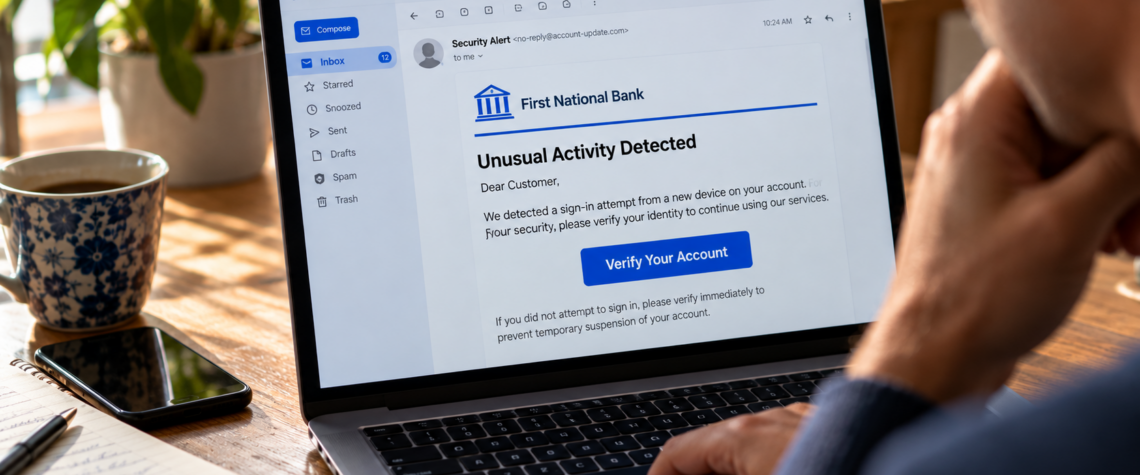
For years, we were told how to recognize a phishing email: bad grammar, strange spelling, suspicious logos and absurd requests. Those clues haven’t disappeared. But scammers are getting better at eliminating them. The dangerous email of today may look exactly like the kind of message you receive every day. The email looks perfectly ordinary. Your bank has detected unusual activity. A package couldn’t be delivered. Your streaming subscription needs a payment update. Microsoft wants you to verify your account. Your boss has shared a document with you. There is a logo in the right place. The colors look familiar. The message is professionally written. There are no obvious spelling mistakes and no mysterious millionaire offering you an inheritance. At the bottom is a button: Verify Account.
For years, consumers were taught to recognize phishing by looking for mistakes. That advice was useful because many fraudulent messages really were badly written and poorly designed. But it created a dangerous assumption: If the email looks professional, it must be real. It doesn’t.
The Federal Trade Commission continues to warn that phishing messages impersonate familiar businesses and institutions to persuade people to click links, open attachments or surrender personal and financial information. In 2024, email was the most frequently reported method scammers used to contact consumers, according to FTC data. Consumer Advice The challenge now is learning to recognize fraud when the fraud looks good.
The Old Warning Signs Are No Longer Enough
Imagine a scammer who wants to impersonate your bank. Years ago, producing a convincing email required some effort. The criminal needed decent writing skills, appropriate graphics and enough knowledge of the institution to imitate its communications. Generative AI lowers some of those barriers.
A scammer can ask an AI system to rewrite awkward prose in professional English, adjust the tone to sound like a customer-service department or produce variations of a message for different audiences. Translation can also make it easier to create convincing messages in multiple languages. That doesn’t mean every polished email was written by AI, nor does it mean traditional warning signs have become useless. Misspelled domains, strange addresses, awkward language and sloppy formatting can still reveal fraud. But good grammar is no longer evidence of legitimacy. The question has changed from “Does this email look real?” to “Can I independently establish that it is real?” That is a much better security habit.
The Message Doesn’t Need to Fool You for Long
A phishing email rarely needs to maintain an elaborate deception. It needs one click. That click might take you to a website designed to resemble your bank, email provider or another familiar service. You enter your username and password, and the page reports an error. Perhaps you try again. Meanwhile, the information you entered has gone somewhere else.
Other phishing attacks use attachments that can expose a device to malicious software. The FTC advises consumers not to click links or download attachments in unexpected messages and, when a message might be legitimate, to contact the company using a website or telephone number they already know is genuine. Consumer Advice Notice what that advice does not require. You don’t have to become a cybersecurity expert. You simply have to stop letting the suspicious message control how you verify it.
Don’t Use the Door the Stranger Gave You
Suppose you receive an email that appears to come from your bank: “We detected suspicious activity. Click here immediately to secure your account.” Your instinct may be to click because the possibility of fraud feels urgent. Do the opposite. Close the email. Open your bank’s app yourself, or type the bank’s address into your browser using an address you already know. You can also call the number printed on your card. If there really is a problem, you should be able to discover it without using the link contained in the unexpected message. This simple habit defeats one of phishing’s most effective tricks: the scammer creates both the emergency and the doorway through which you are supposed to solve it. Don’t use their doorway. Find your own.
Look at the Address, Not Just the Name
An email inbox may prominently display a sender name such as:
PayPal Security
Microsoft Account Team
Your Bank
But the visible name is not necessarily the sender’s actual address. Look more closely. A fraudulent address may contain an extra letter, a substituted character, an unfamiliar domain or a name designed to look legitimate at a glance. FTC guidance for businesses specifically recommends examining the underlying sender address and checking where links actually lead before interacting with them. Federal Trade Commission
This is particularly important on phones, where small screens can hide details that are easier to notice on a computer. Still, don’t turn this into a detective game in which you believe you can authenticate every sophisticated message by examining the address. If money, passwords or sensitive information are involved and you have doubts, independent verification is safer than visual inspection.
Urgency Is a Clue
Phishing is a technical crime built around human emotion. The message may tell you your account will be suspended. Your package will be returned. Your password expires today. Someone has logged into your account. Your payment failed. You have an unpaid toll. The details change, but the psychological mechanism remains remarkably consistent: act before you think.
The FTC continues to report scams built around fake delivery notices, unpaid tolls, account problems and other supposedly urgent situations. Its 2026 consumer guidance emphasizes that unexpected messages asking people to click, pay or provide information should be independently checked before action is taken. Consumer Advice A legitimate problem can be urgent, of course. But urgency should increase your caution, not decrease it.
Sometimes the Email Really Did Come From Someone You Know
There is a more difficult version of phishing. The message comes from a real account belonging to your colleague, friend or relative. If that person’s email has been compromised, a criminal may be able to send messages from an address you already trust. In a business environment, an attacker may even have enough context to make the request sound plausible. “Can you review this document?” “Here’s the invoice we discussed.” “I’m in a meeting. Can you take care of this payment?” Now checking the sender’s address may not save you. The address can actually be correct. This is why context matters. Is the request normal for this person? Were you expecting the attachment? Is someone suddenly asking you to send money, reveal credentials or change payment instructions? When the consequences could be significant, verify the request another way.
Call.
Send a separate message.
Walk down the hall.
A thirty-second conversation can be worth more than ten minutes examining an email.
Your Password Isn’t the Only Thing They Want
Phishing is often associated with stolen passwords, but the target can be almost anything valuable. A fake website might ask for your credit-card information, Social Security number or banking details. An attachment may attempt to install malware. A fraudulent invoice can redirect a payment. A fake login page can capture credentials that criminals then try on other services. And increasingly, attackers may want something that appears harmless: a verification code.
As we discussed in Is Your Password Still Enough?, a second authentication factor protects you only if you keep it to yourself. If someone persuades you to reveal the code generated during a login attempt, you may be helping that person defeat the additional security protecting your account. The phishing email is therefore not always the attack itself. Sometimes it is simply the first move.
What If You Already Clicked?
First, don’t let embarrassment prevent you from acting. Smart people click fraudulent links. Busy people click them. Technology professionals click them. Phishing succeeds precisely because it is designed around normal human behavior: curiosity, fear, trust, distraction and urgency. What you should do next depends on what happened.
If you entered a password into a suspicious site, change it promptly through the legitimate service and change it anywhere else you reused it. Turn on multi-factor authentication if it is available. If you provided financial information, contact the relevant financial institution quickly. If you downloaded something suspicious or gave someone access to your device, security software and professional assistance may be appropriate.
The FTC recommends changing compromised passwords, enabling two-factor authentication and taking additional recovery steps when scammers gain personal information or access to a computer or phone. Consumer Advice Speed matters much more than embarrassment.
A Better Question Than “Does It Look Real?”
The internet trained us to judge authenticity visually. Does the website look professional? Is the logo correct? Does the email sound legitimate? Those questions made sense when producing a convincing imitation required considerable skill. They are becoming less useful. Professional writing can be generated. Logos can be copied. Websites can be imitated. Sender names can be manipulated. Familiar language can be reproduced. So we need a different question: “Can I verify this without using anything the message gave me?”
If your bank supposedly contacted you, open the bank’s app yourself. If a company says there is a problem with your account, visit the site independently. If your boss requests an unusual payment, confirm it through another channel. If a friend sends an unexpected attachment, ask whether they sent it.
That tiny change in behavior shifts control away from the person who created the message. And that may be the most important lesson of modern phishing. The dangerous email of the future may not contain a misspelled word, an obviously fake logo or a ridiculous promise.
It may be beautifully written.
It may know your name.
It may arrive at exactly the moment you expect it.
It may look completely real.
That’s the problem.